


Guide to Accurately Checking Social Insurance Participation History Online and on Mobile; How to Check a Company’s Social Insurance Contribution Results; How to Integrate Social Insurance Participation History on VNeID
Checking social insurance participation history helps employees understand the duration, contribution levels, and receiving social insurance agency... This is crucial information to ensure entitlement to social insurance benefits and verify working periods
Employees can now easily check their social insurance participation history on websites and mobile devices.
Why Is It Necessary to Check Social Insurance Participation History?
The social insurance number, consisting of 10 digits, is a unique identifier for each social insurance participant.
Employees should regularly check their social insurance participation history to:
- Accurately determine the number of years of social insurance contributions.
- Cross-check if the salary subject to social insurance contributions matches the actual amount.
- Serve as a basis for calculating benefits such as pensions, maternity leave, sick leave, and one-time allowances.
- Timely detect if a company fails to contribute or under-contributes to social insurance.
How to Accurately Check Social Insurance Participation History Online
Method 1: Check Social Insurance Participation History on the Vietnam Social Insurance Website
STEP 1: : Visit https://baohiemxahoi.gov.vn/tracuu and select the “Check Social Insurance Participation History” section. After selection, the interface screen will appear as follows:
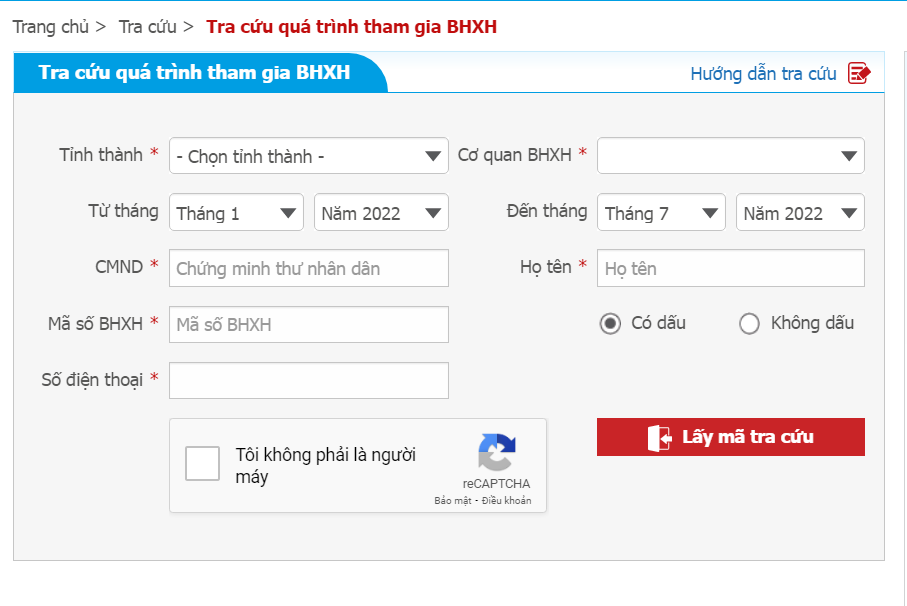
Step 2:Process for Entering Search Information:
- Enter information about the province/city and the social insurance agency where insurance registration was made.
- Enter the period to be checked: from month … to month
- Enter the ID number (citizen identification number)
- Enter the full name of the social insurance participant and check the box for accented or unaccented characters.
- Enter the social insurance number of the individual participant after retrieving it.
- Enter the registered phone number to receive the OTP code
- Check the “I am not a robot” box and wait for verification.
- Click the “Get OTP Code” box
- Check the phone message to retrieve the OTP code sent and enter it correctly, then click “Search”.
Note: At this step, act quickly, as the OTP code sent is valid for only 4 minutes; if this time expires, you will need to repeat the process to get a new code.
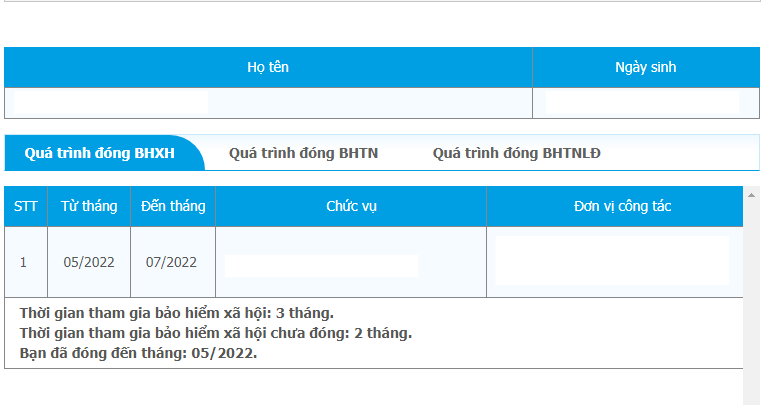
- After clicking “Search,” if all information is completely accurate, the system will return a result table with full details on the participation period, position, and work unit of the person being checked.
Method 2: Check Social Insurance Participation History via Phone Message
- Search by year of social insurance participation using the following syntax
BH QT {social insurance number} {from year} {to year} send to 8079
Example: Compose a message with the syntax BH QT 0201070283 2000 2020 send to 8079
Method 3: Check Social Insurance Participation History Using the VssID Application
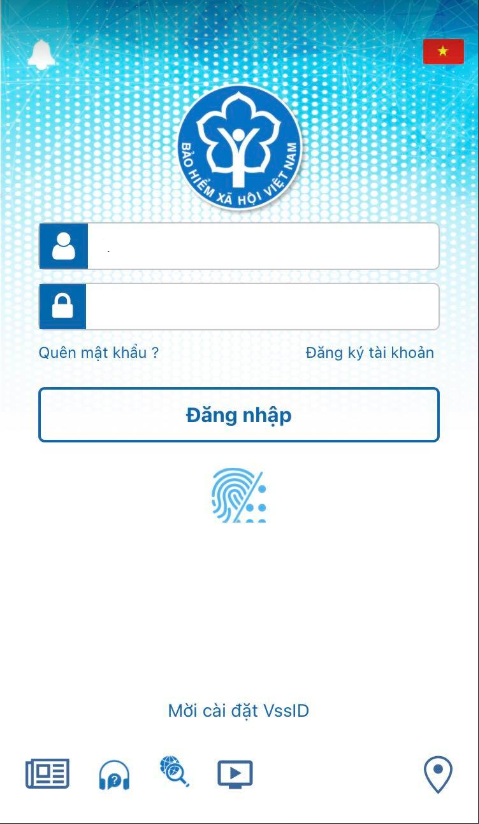
STEP 1: : Log in to the Account to Check Social Insurance
Users log in with their own social insurance account or the account they wish to check. If no login account exists, register one directly on the application.
STEP 2: Perform the Search
After successful login, the application interface will include the following main sections:
- Personal Management;
- Social Insurance Information Search;
- Support.
Next, select “Personal Management” to check your social insurance participation information.
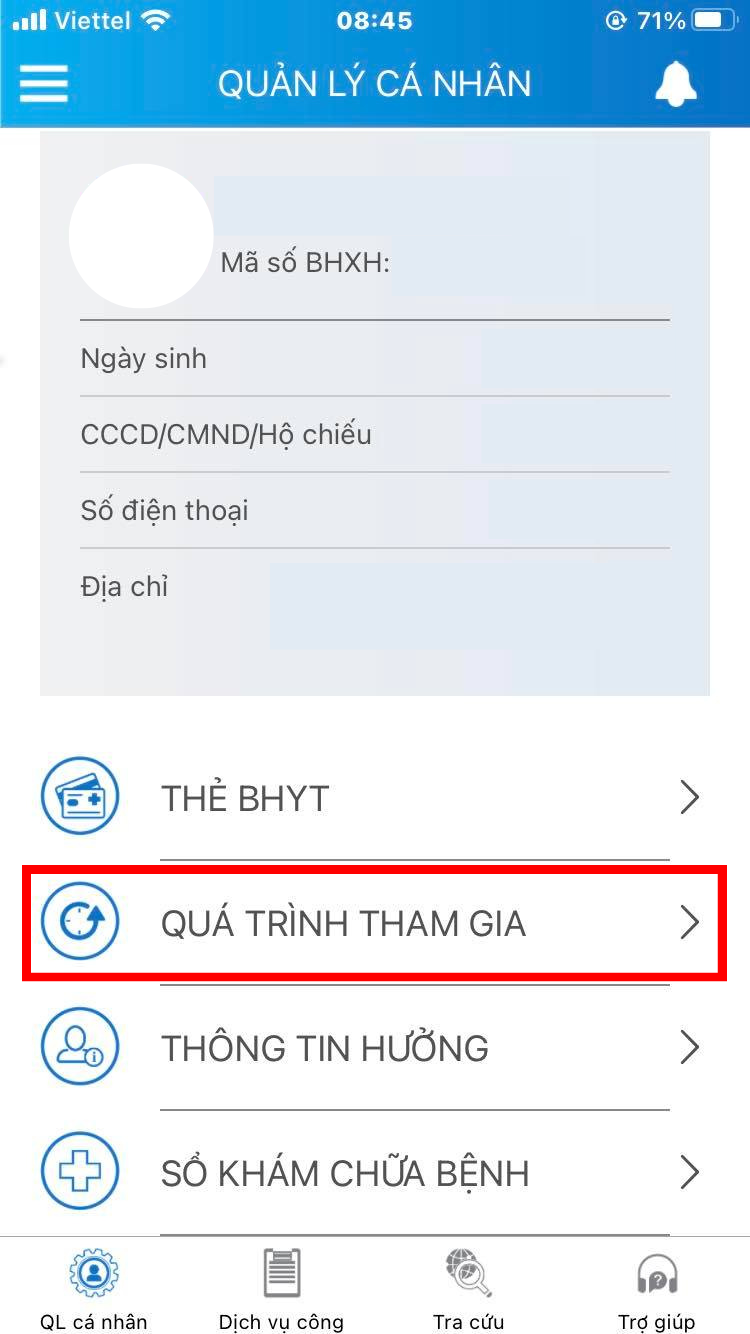
The screen will display the insurance participation history, including social insurance (BHXH), unemployment insurance (BHTN), occupational accident insurance (BHTNLĐ), and health insurance (BHYT).
Then select the type of insurance the user wants to check by clicking the desired section.
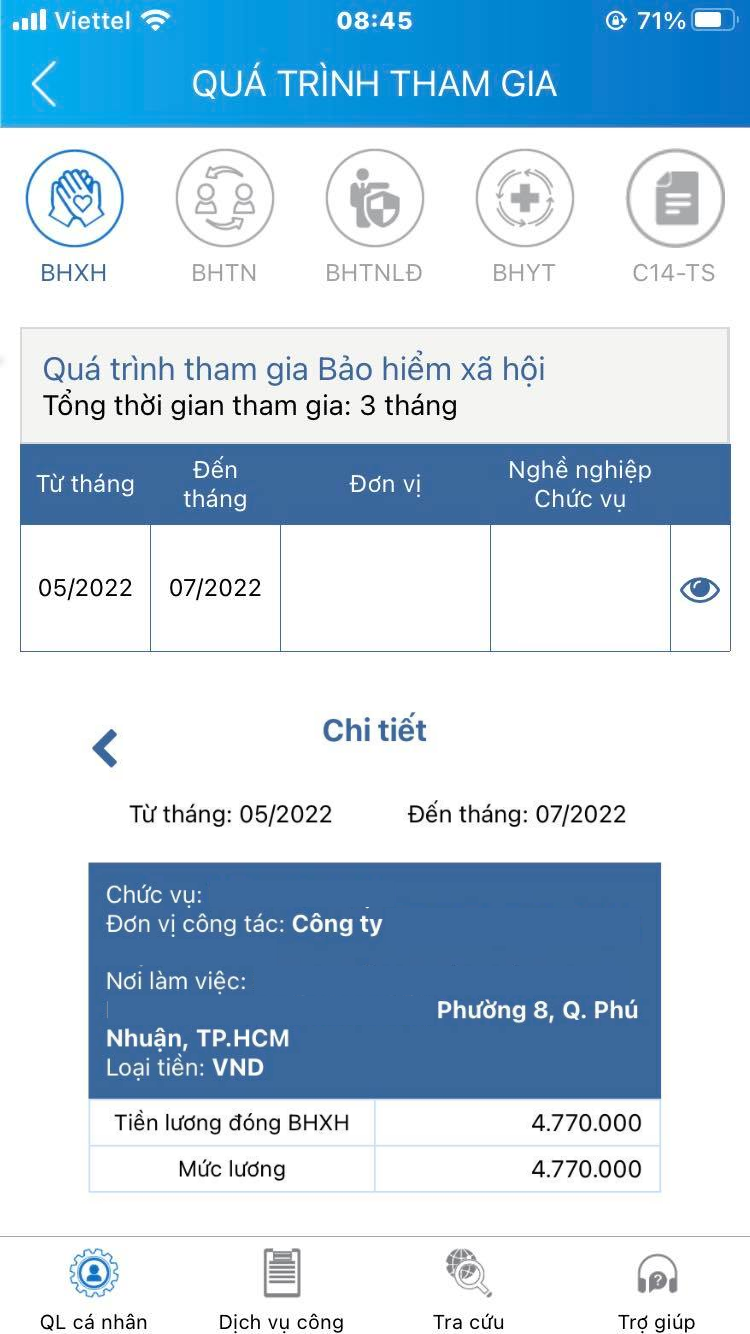
Step 3: View Detailed Social Insurance Participation History
After the screen displays the insurance participation history, users can view detailed information such as duration, unit, occupation, position, and contribution level.
Participating employees can view detailed social insurance participation information by accessing specific sections for checking.
The participation history recorded in the system will serve as the basis for determining eligibility for social insurance benefits for participants.
How to Check a Company’s Social Insurance Contribution Results
Method 1: Check on the Vietnam Social Insurance Public Service Portal
Step 1:. Access the Vietnam Social Insurance Public Service Portal.
Step 2:. Tiến hành Đăng nhập vào hệ thống của Bảo hiểm xã hội Việt Nam, chọn Tổ chức và nhập thông tin tài khoản.
- Company Code: The company’s tax identification number.
- Password:Issued by Vietnam Social Insurance
- Verification Code:Enter the characters displayed on the screen and select “Login.”
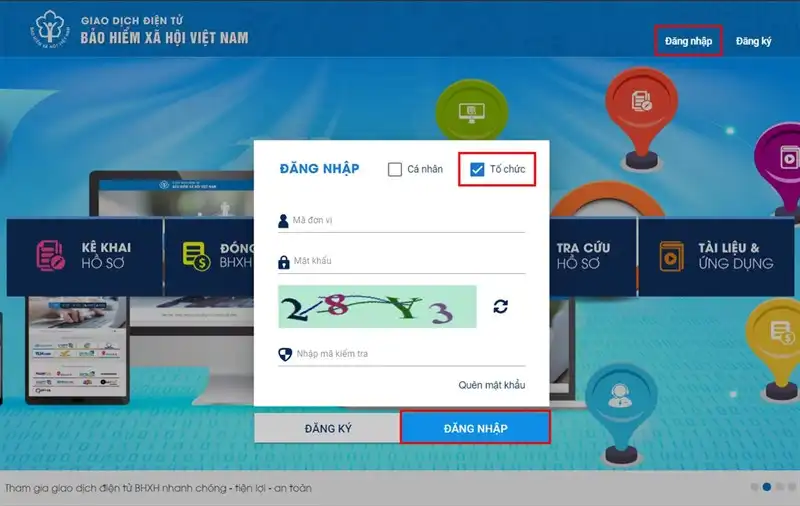
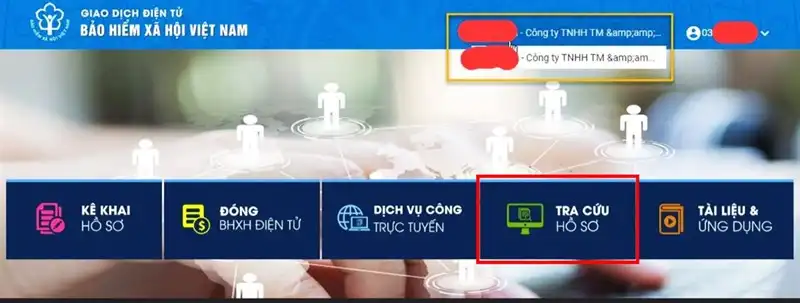
Step 3:After successfully logging in with the company account, select the “File Search” function.
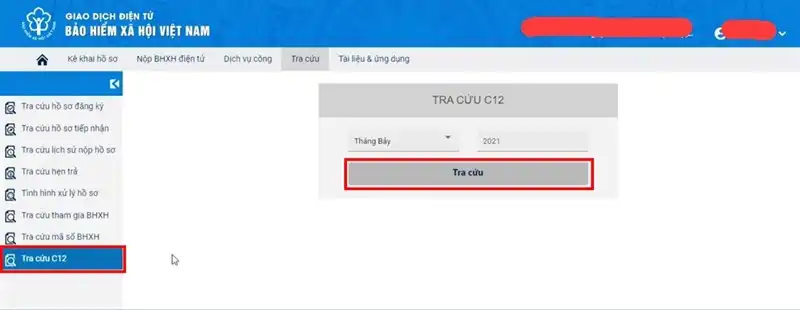
Step 4:Select the “C12 Search” tab. In the search box, choose the Month and Year to check, then click the “Search” button.
Step 5:. The system will automatically export a PDF file of the C12-TS result template for you.
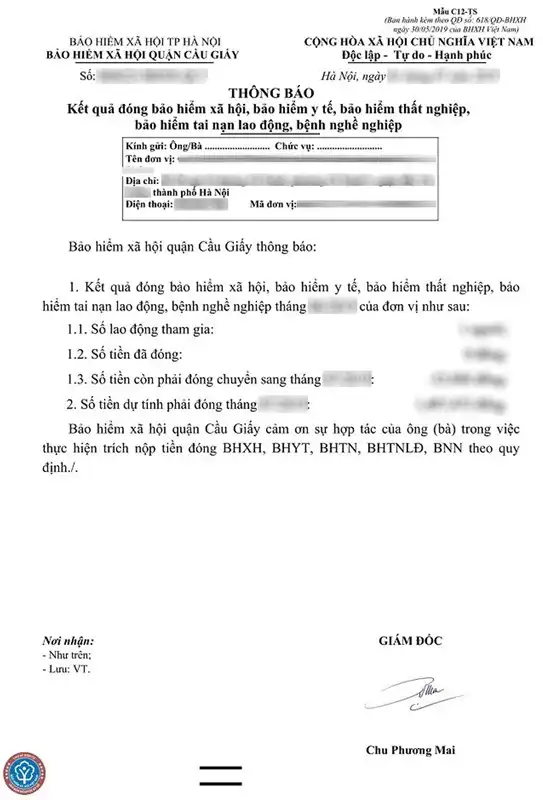
Method 2: Check Social Insurance Participation History on the VssID Application
STEP 1: Open the VssID application on your phone and log in using the social insurance number and the provided password.
STEP 2: : On the main screen, select “Personal Management,” then click on the “Participation History” section.
STEP 3: The interface will display all information related to your social insurance participation history.
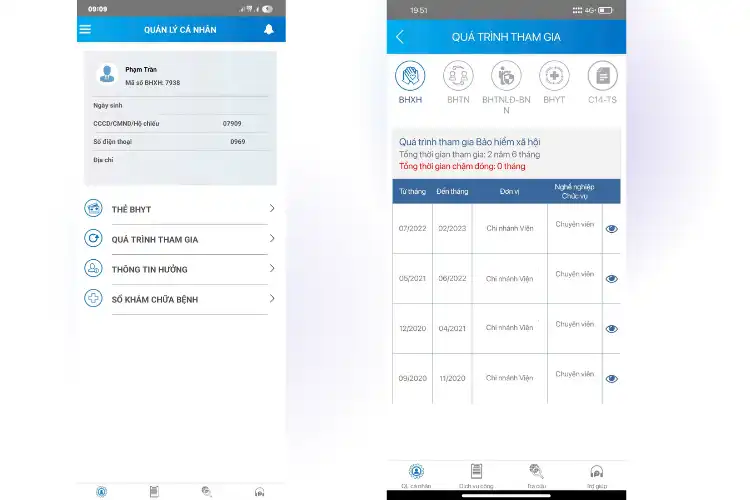
Here, you will see the following information:
- Total years/months of social insurance participation.
- Periods of interruption or delayed contributions (if any).
- Details of each contribution period, including specific duration and salary basis for contributions.
- Click the eye icon to display detailed contribution levels for each period.
How to Integrate Social Insurance Participation History on VNeID
In addition to checking and tracking information about social insurance (BHXH), health insurance (BHYT), and unemployment insurance (BHTN) on the VssID - Digital Social Insurance application, citizens can now integrate their social insurance participation history into another application, VNeID, by the Ministry of Public Security.
STEP 1: Log in to the VNeID application and access the function screen
- On the “Document Wallet” screen, select “Social Insurance.”
- Enter the correct passcode
- The system will display the Social Insurance screen
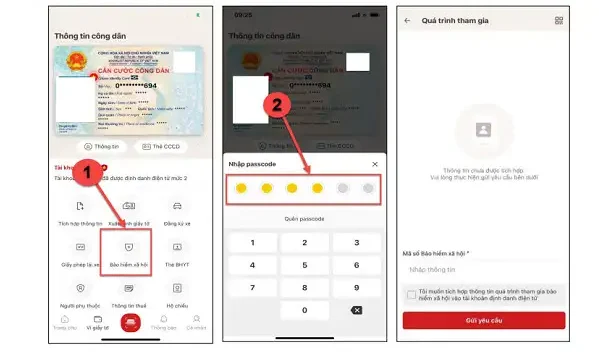
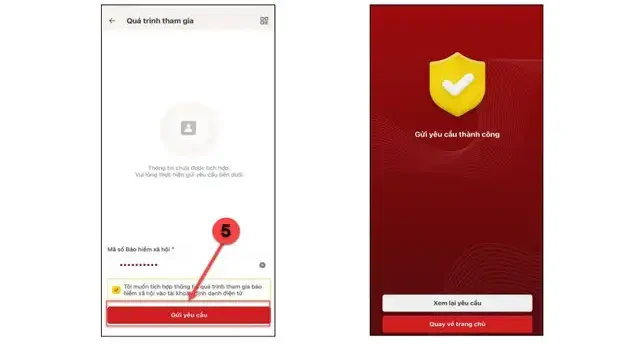
Step 2:Enter Integration Information
- Enter Social Insurance Number: Input the full 10-digit number
- Check the box “I want to integrate social insurance participation information into the electronic identification account”
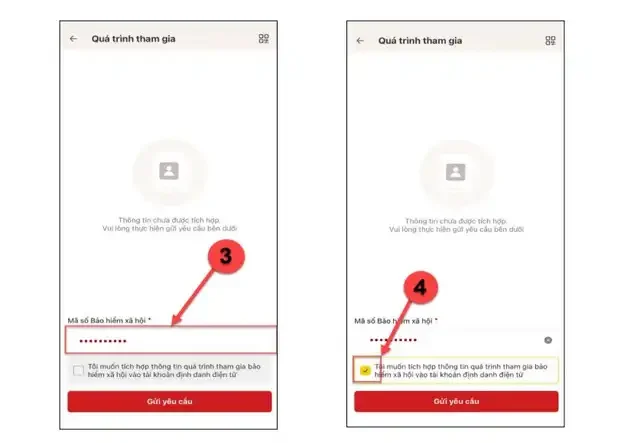
Step 3:Submit a Request to Integrate Social Insurance Participation Information
- After the “Request Submitted Successfully” screen appears, click “Return to Homepage” to go back to the electronic identification account homepage
- Click “Review Request” to check the status of the submitted integration request
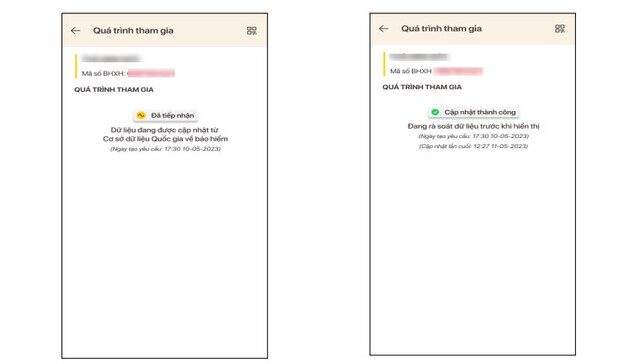
Step 4:Check the Status of the Application
After successfully submitting the integration request, citizens can access the Social Insurance function to monitor the processing status of the application.
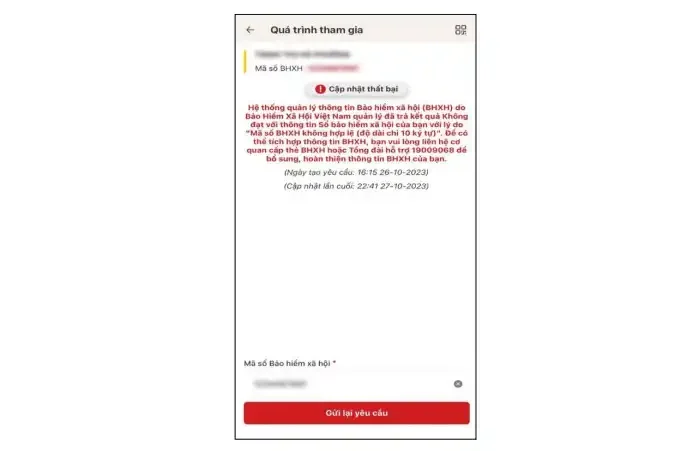
For applications with a “Update Failed” status, citizens should enter the Social Insurance Number and click “Resubmit Request” to resend the integration request.
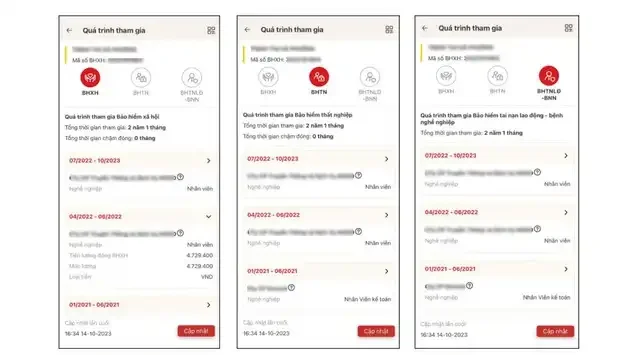
Step 5: After the system completes data verification, it will display the entire social insurance participation history
Can You Check Someone Else’s Social Insurance Participation History?
According to regulations, you can only check someone else’s social insurance history if:
-
You are a legal guardian or representative of the employing organization.
-
You have complete information: full name, ID/CCCD number, social insurance number.
-
There is authorization or a clear consent document (in some cases).
Example: : An employee wanting a company to check their contribution history must provide their social insurance number and a confirmation document.
Conclusion
Checking social insurance participation history is a necessary step to ensure full benefits when retiring, leaving a job, giving birth, or facing risks.
With the above guidance, employees can easily check information anytime, anywhere.
Contact VINA TPT for Support
📞 (+84) 984 980 069
📧 vtpt-infor@classlib.net
🌐 https://vietnamtax.net.vn/
🏢 5th Floor, More Building, 83B Hoang Sa, Da Kao Ward, District 1, HCMC